
If you need to contact PikoBuy support about an order, the fastest-looking message is not always the easiest one to resolve. ‘Where is my order?’ gives an agent almost nothing to identify, while twenty unsorted screenshots can hide the one record that matters. A useful case connects one order or parcel to one problem, a dated timeline and one requested next action.
PikoBuy’s current Contact page presents a support email and marks ticket submission as the recommended route. Its Beginner Guide also describes customer service as available around the clock. Those statements identify official ways to ask for help; they do not publish a universal first-response time, resolution deadline or guaranteed outcome for every case.
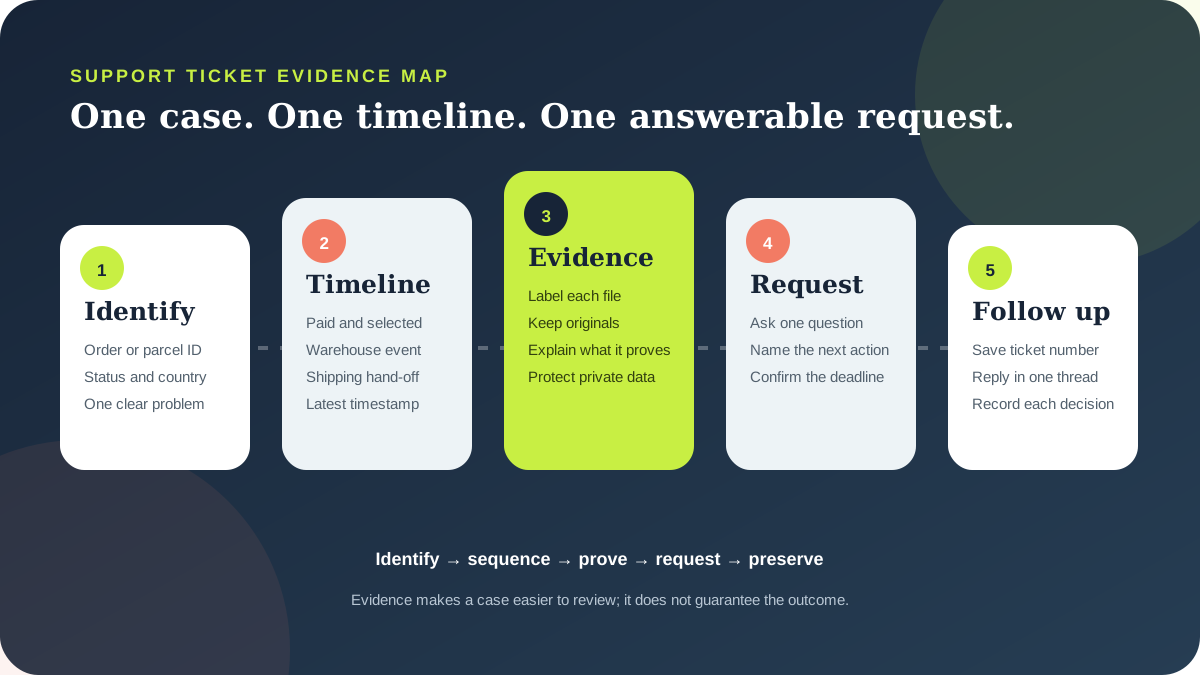
This checklist turns scattered records into a compact support brief and helps distinguish a seller issue, warehouse problem, carrier event and after-sales request.
01
Use the official route and keep the case private
Start from PikoBuy’s current Contact page or the support control inside the signed-in order interface. The public Contact page identifies ticket submission as recommended and also displays a support email. Use the live official page rather than an address copied from an old post, screenshot or unofficial community account, because contact details and interface routes can change.
A ticket can keep an order-specific request in one chronological thread. If you use email, retain one subject line instead of opening competing cases. Never post an order number, address, identity document, payment record or full shipping label in a public channel.
Never send a password, verification code, complete card number or security code. Share only what is required to identify the order and follow the live support interface’s authentication instructions.
02
Open with a six-line case identity block
Make the first screen readable without opening an attachment. State the order number or parcel number, item identifier if relevant, current status, destination country, the date and time the problem became visible, and a one-sentence issue. Use the identifiers exactly as displayed in the account rather than shortening or retyping them from memory.
Match the identifier to the stage. A warehouse question needs the item and order record; a dispatched-parcel problem needs the parcel number, route and tracking reference; a delivery issue also needs the delivery timestamp. Keep unrelated orders separate.
PikoBuy’s Terms of Service require accurate, complete and current registration and shipping information. If the issue concerns an address, recipient name or postcode, quote the value shown on the submitted parcel record and describe the difference precisely. Do not quietly edit the story after dispatch; ask whether any correction is still possible at the current stage.
- Order, item or parcel identifier
- Current status and latest timestamp
- Destination country and route when relevant
- One-sentence problem and requested next action
03
Name the stage before naming the remedy
PikoBuy’s published workflow separates item selection, purchasing payment, warehouse inspection, international shipping payment and delivery. Use that sequence to locate the problem. A seller who has not shipped, an item that arrived incorrectly at the warehouse, a parcel waiting for its first carrier scan and a damaged delivered parcel require different records and may involve different parties.
The User Registration Agreement says PikoBuy is not the actual product seller and that international logistics providers operate independently. It also says users may authorise PikoBuy to help communicate with a third-party logistics provider, while compensation follows that provider’s standards. Ask support to identify the responsible stage and applicable process instead of demanding a seller refund for a carrier event or a carrier claim for a warehouse mismatch.
If the item is still in the warehouse, check the live Returns & Exchanges page immediately. Its published five-day service uses a 120-hour application window for eligible items from the first ‘In Warehouse’ status, subject to seller, condition, packaging and category rules. Do not present that warehouse rule as the deadline for every international after-sales case.
04
Attach evidence in chronological order
Use a small evidence index rather than an image dump: paid order, warehouse record, parcel submission, tracking event and delivered condition. Explain what each file proves, and retain timestamped originals even if the interface requires compressed copies.
For a warehouse mismatch, include the seller listing saved at purchase, selected colour or size, paid quantity and the relevant QC image. For a tracking question, provide dispatch date, route, first scan and latest scan. PikoBuy’s Beginner Guide says tracking information should be available within three days after shipping, so if that stated point has passed, ask whether the parcel was handed to the carrier and whether a tracking number or carrier confirmation exists.
For a delivered parcel problem, preserve the shipping label, every side of the sealed package, seals and tape, an opening sequence when practical, all contents and the delivery timestamp. The User Registration Agreement tells recipients to inspect outer packaging at signing and contact customer service immediately when an issue appears after signing. Evidence supports review; it does not by itself prove liability or guarantee compensation.
05
Ask one question that support can answer
End the first message with one concrete request. Examples include: confirm whether the seller has supplied a domestic tracking number; check whether the warehouse recorded the selected size; confirm whether the parcel was handed to the named carrier; identify the after-sales deadline for this delivered parcel; or state which additional document the logistics provider requires. A specific request gives the reply a clear decision point.
Avoid opening with a compensation figure unless the current terms and evidence establish that calculation. PikoBuy’s public agreement distinguishes seller responsibility, warehouse inspection limits, third-party logistics, optional insurance and exclusions. It does not publish one universal refund formula for every order problem. Ask which rule applies to the exact order and request the current written basis for any decision.
If the public page and order interface appear inconsistent, include both dates and ask which rule controls the case. Preserve the date, identifier and surrounding conditions in every screenshot.
06
Record deadlines without inventing one
PikoBuy’s User Registration Agreement says delivered-parcel after-sales service must be requested within its validity period and that the period is calculated from delivery days and receipt-confirmation time. The reviewed public page does not state one universal number of days for every delivered-parcel issue. Open the case promptly and ask support to state the exact deadline that applies.
Save the ticket number, submission time and every reply. If support requests more evidence, answer in the same thread, list the new files and record when they were sent. If no reply appears, follow up with the existing ticket reference and the unresolved question; opening duplicate tickets can split the chronology and make it less obvious which thread contains the complete record.
The Contact page promotes timely replies and the Beginner Guide describes 24/7 customer service, but neither reviewed page guarantees a per-case response time. Silence after a particular number of hours does not itself prove rejection or compensation eligibility.
07
Use a compact support-message template
A practical opening can read: ‘Parcel [number], destination [country], delivered [date and time]. One paid item [item ID and quantity] was not present. The attached sequence shows the paid order, warehouse record, submitted parcel, sealed delivery and complete opening. Please confirm the recorded packed quantity, the applicable after-sales deadline and the next evidence required.’ Replace the facts; do not copy a missing-item allegation into an unrelated case.
For a warehouse return, request eligibility review and include the first In Warehouse timestamp. For tracking, ask for hand-off confirmation and the active reference. For damage, name the visible damage and preserve the packaging.
A well-built ticket cannot guarantee a refund, return, reshipment, carrier investigation or compensation. It can reduce avoidable back-and-forth and create a record of what was reported, when it was reported and what support decided. Current order screens, transaction-specific terms and written case instructions take priority over this independent checklist.
Practical FAQ
PikoBuy customer-support questions
What is the official way to contact PikoBuy about an order?
PikoBuy’s current Contact page displays a support email and marks ticket submission as recommended. For an order-specific problem, start from that official page or the support control in the signed-in order interface, and keep the ticket or email reference.
Does PikoBuy guarantee a customer-service response time?
The Beginner Guide describes 24/7 customer service and the Contact page promotes timely replies, but the public pages reviewed on 19 September 2026 do not publish one guaranteed first-response or resolution time for every case.
What should the first PikoBuy support message include?
Include the exact order, item or parcel identifier; current status; relevant date and destination; one-sentence problem; a short chronological evidence index; and one requested next action. Keep sensitive credentials and full payment-card data out of the message.
Should I open another ticket if the first one has no answer?
Preserve the existing case reference and follow up in the same thread with the unresolved question and any requested evidence. The reviewed public pages do not publish a universal escalation interval, so check the current support interface before creating a duplicate case.
Source record
What this guide relies on
Platform functions and policies can change. Open the current source before relying on a route, deadline, fee or account decision.
PikoBuy Contact page — recommended ticket route and support email↗PikoBuy Beginner Guide — 24/7 customer-service statement, six-stage workflow and tracking availability↗PikoBuy User Registration Agreement — service roles, signing checks, after-sales timing and logistics communication↗PikoBuy Terms of Service — service scope, accurate-information duties and after-sales support↗PikoBuy Returns & Exchanges — warehouse timing, eligibility and evidence boundaries↗