
A PikoBuy item not in warehouse after the seller has shipped is a matching problem before it is a delay conclusion. The seller may have created a domestic label, the carrier may show movement, or the tracking page may even say delivered, while the PikoBuy account still does not show the item as In Warehouse. Those records describe different events and should not be treated as interchangeable.
PikoBuy’s Beginner Guide says warehouse inspection begins once items arrive: check-in, photo confirmation and a defect check. Its Shipping Terms give the most explicit inbound sequence for forwarded goods: obtain the warehouse address, submit the forwarding form, wait for receipt, then view the photos and stored item on the order page. Neither page publishes one universal number of hours between a domestic delivery scan and completed account check-in.
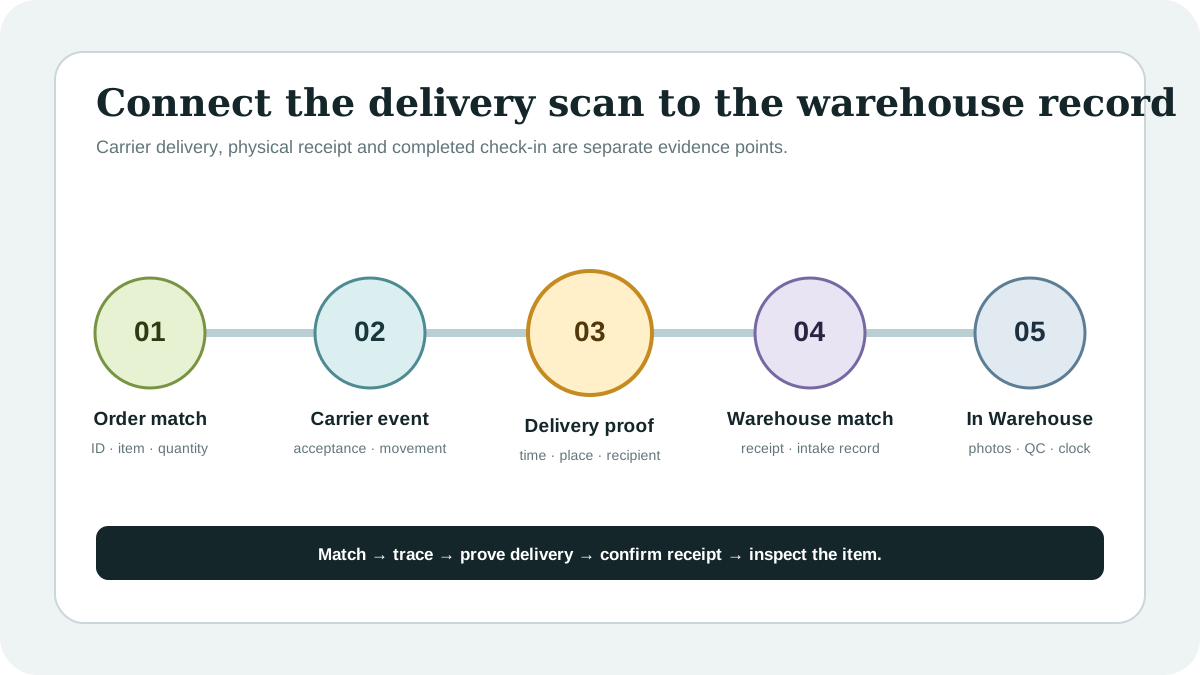
The practical goal is to connect one order, one domestic tracking number and one warehouse record without guessing where the gap occurred. This checklist shows what to preserve, how to separate carrier delivery from warehouse intake, when the published return clock begins and how to ask support for one verifiable answer.
01
Confirm that the seller-shipment stage is complete
Start only when there is evidence beyond a seller promise. Save the PikoBuy order ID, exact item and variant, seller-dispatch time, domestic carrier name, tracking number and full event history. A tracking number without carrier acceptance still belongs in the seller-fulfilment diagnosis covered by the previous guide; it does not prove that a parcel began moving toward the warehouse.
Match the tracking record to the correct order. Consolidated purchases, split seller shipments and several visually similar items can make a domestic number look relevant when it belongs to a different quantity or package. Record the seller name, product title, quantity and any shipment reference shown beside the number. If one order has two domestic numbers, document both rather than assuming the first covers everything.
PikoBuy’s User Registration Agreement explains that PikoBuy is not the actual seller and that third-party purchasers provide purchasing-agent services. That separation matters: the seller dispatches the goods, a domestic carrier moves them, and the warehouse later signs for and inspects eligible arrivals. A status gap does not identify which party caused it without evidence.
- PikoBuy order ID, seller and selected variant
- Domestic carrier and complete tracking number
- First acceptance, latest movement and delivery events
- Quantity and any split-shipment references
02
Read the domestic tracking event literally
Copy the latest carrier wording exactly, together with its date, time and location. ‘Label created,’ ‘collected,’ ‘in transit,’ ‘delivery attempted,’ ‘delivered’ and ‘returned’ are different evidence states. These examples are diagnostic categories, not a PikoBuy status dictionary. The public PikoBuy pages reviewed on 29 September 2026 do not publish definitions for every domestic carrier message.
Do not convert a quiet tracking page into proof that the item is lost. It may show only that the carrier has not posted a later event. Likewise, a delivered label establishes what the carrier recorded; it does not by itself show that PikoBuy matched the parcel to your order, completed inspection or changed the account status to In Warehouse.
Look for evidence that can narrow the hand-off: destination city, delivery timestamp, recipient or proof-of-delivery field when safely available, and any exception message. Do not publish or send a full warehouse address in a public post. Share sensitive delivery details only through the official signed-in support route and redact unrelated personal data.
03
Separate carrier delivery from warehouse check-in
PikoBuy’s Beginner Guide describes warehouse work after arrival as check-in, photo confirmation and defect checking. Its Shipping Terms say that forwarded goods are received, photographed for confirmation and then stored. This sequence shows why a carrier-delivered event and an account-side In Warehouse record are not the same checkpoint.
For purchasing-agent orders, use the order page as the account record. For goods you arranged to forward yourself, also confirm that the required forwarding form was submitted with the correct tracking and item information. The Shipping Terms specifically place form submission before waiting for warehouse receipt. A parcel sent to an address without a usable matching record may need an order-specific investigation; the public page does not promise automatic identification.
Build a short comparison table in your notes: carrier delivery time, destination shown, tracking number submitted, forwarding or purchase order ID, first warehouse status and first photo time. Leave an empty field blank rather than filling it with an estimate. The first unexplained blank tells support what to investigate.
04
Check identity, quantity and inbound exceptions
A warehouse-arrival problem can be a timing gap, but it can also be an identity or quantity mismatch. Compare the seller’s shipment quantity with the order quantity and note whether the seller used one parcel for several items. If a parcel is shown as received later, compare every photographed item with the original variant before closing the case.
PikoBuy’s Shipping Terms state that forwarded goods are unpacked and inspected. They also say that if goods are missing when the warehouse receives them, the sender should be contacted for verification and PikoBuy does not compensate for shortages not caused by PikoBuy. That wording applies specifically to forwarded products, so do not automatically apply it to a purchasing-agent dispute; ask support which process governs your order.
The same terms note that cash-on-delivery shipping fees for forwarded parcels may be deducted from the account balance and advise keeping sufficient balance for smooth warehousing. If your case is a forwarding order, check whether a COD amount or another intake requirement is visible. This is a targeted check, not a claim that an unpaid charge explains every delayed check-in.
05
Protect the warehouse QC and return record
Do not review QC until the account shows the received item and its photos. A domestic delivery scan cannot prove the product identity, selected size, colour, quantity, visible condition or included parts. Once the warehouse record appears, compare it with the saved listing and order before moving the item into an international parcel.
PikoBuy’s Returns & Exchanges page says the published five-day window is counted as 120 hours from the next hour after an eligible order first changes to In Warehouse. A carrier delivery timestamp is not described as the start of that clock. Preserve screenshots of both the domestic delivery event and the first In Warehouse status so the two dates cannot be confused.
Eligibility still depends on the seller, product condition, packaging and category rules, and the policy says PikoBuy can return a product only with the seller’s consent. A late check-in does not guarantee that a return will be approved or extend a seller’s rules. Inspect promptly when photos appear and ask support to confirm any order-specific deadline if the recorded dates conflict.
06
Escalate with one timeline and one requested outcome
PikoBuy’s Contact page lists a support email and marks ticket submission as the recommended route. Use the official page or signed-in account control and keep the case in one thread. The page promotes timely replies, but the public sources reviewed do not publish a guaranteed first-response, warehouse check-in or resolution time for every inbound parcel.
A useful opening is: ‘Order [ID], item [title, variant and quantity], domestic carrier [name], tracking [number]. The carrier shows [exact event] at [date, time and location], but the account still shows [exact status]. The tracking was linked or submitted on [time]. Please confirm whether the warehouse physically received this parcel, whether it can be matched to my order, and what evidence or next action is required.’
Attach the order screen, complete tracking history, delivery proof if available, seller-shipment record and forwarding-form confirmation when relevant. Hide passwords, verification codes and full payment credentials. Ask for a factual checkpoint—received, not received, unmatched, incomplete or returned—rather than demanding a conclusion that the available record cannot support.
Close the evidence file only when the item appears with photos, the warehouse confirms a different disposition, or support records another final outcome. Save the first In Warehouse time and the response reference. That creates a traceable bridge from domestic shipment to QC and keeps this issue separate from international tracking, which begins only after a later parcel is submitted and dispatched.
Practical FAQ
PikoBuy warehouse-arrival questions
Why does domestic tracking say delivered but my PikoBuy item is not in the warehouse?
The carrier event and PikoBuy’s completed check-in are separate records. PikoBuy describes receipt, photo confirmation, inspection and storage after arrival, but its public pages do not publish one universal check-in time. Match the tracking to the order and ask support to confirm physical receipt and order matching.
How long does PikoBuy warehouse check-in take after domestic delivery?
The official pages reviewed on 29 September 2026 do not state one guaranteed number of hours for every purchasing or forwarding order. Preserve the delivery timestamp, tracking number and order link, then request the current status for the specific parcel.
Does the 120-hour PikoBuy return window start when the domestic carrier says delivered?
The published Returns & Exchanges page says the five-day or 120-hour window for eligible items is counted from the next hour after the order status first changes to In Warehouse. It does not say the domestic carrier’s delivered timestamp starts that clock.
What should I send PikoBuy support for an item not in the warehouse?
Send the order ID, item and quantity, domestic carrier and tracking number, full scan history, delivery proof if available, seller-shipment record and forwarding-form confirmation when relevant. Ask whether the parcel was received, matched, held for information or returned.
Source record
What this guide relies on
Platform functions and policies can change. Open the current source before relying on a route, deadline, fee or account decision.
PikoBuy Beginner Guide — warehouse arrival, check-in, photo confirmation, defect check and later international-shipping stage↗PikoBuy Shipping Terms — forwarding form, warehouse receipt, photos, storage, inbound shortages and COD balance note↗PikoBuy Returns & Exchanges — first In Warehouse status, 120-hour timing, eligibility and seller-consent boundary↗PikoBuy User Registration Agreement — seller, purchasing-agent and warehouse acceptance roles↗PikoBuy Terms of Service — service scope, platform role and changing operational features↗PikoBuy Contact page — recommended support ticket route and support email↗