
A PikoBuy order not processed after payment is not one problem with one automatic fix. A checkout can fail before a payment is approved, a payment provider can show a pending transaction that the PikoBuy account has not recorded, or an account transaction can exist without a purchase order being generated or accepted. Treat those as different states before pressing Pay again.
PikoBuy’s Terms of Service say a failed payment means the order will not be processed. Its User Registration Agreement separately says a purchasing order or shipping order will not be generated or confirmed if a necessary service fee is not paid. The same agreement notes that amounts can change slightly with exchange-rate movement and settlement timing. These clauses explain why a bank alert alone is not a reliable order-status screen.
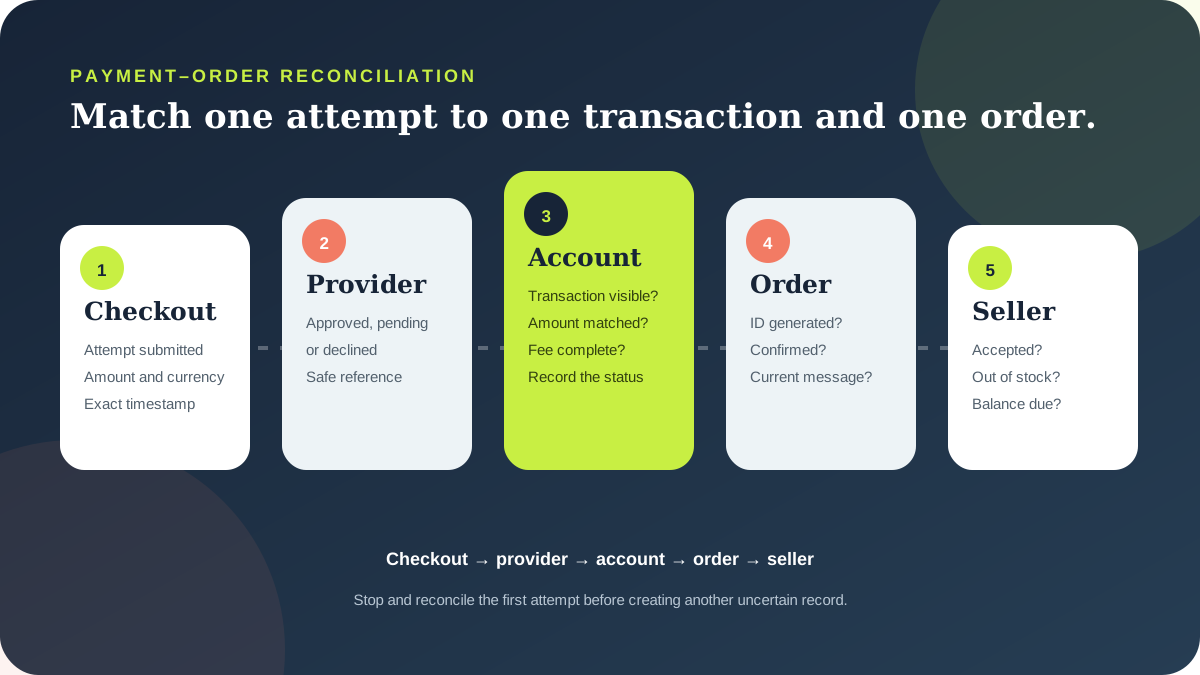
The practical goal is to match one payment attempt to one account transaction and one order state. This checklist shows what to record, how to avoid an unnecessary duplicate attempt and what to send through official support when the records disagree.
01
Identify the exact checkpoint that failed
Start with the last state you can prove. PikoBuy’s Beginner Guide separates item selection, order submission and the first payment from the later warehouse and international-shipping payment. Record whether the problem concerns a product purchase or a parcel-shipping order; the identifiers, amount and expected next status will be different.
Use five checkpoints: checkout submitted, payment-provider result, PikoBuy transaction or balance record, order generated or confirmed, and seller acceptance or procurement. A green bank notification may prove that an authorisation or debit appeared, but it does not by itself prove that PikoBuy generated an order or that a seller accepted it. Conversely, a failed browser page does not prove that no payment record exists.
PikoBuy’s Terms say placing an order is an offer to purchase and that PikoBuy or participating merchants may accept or reject it. Describe the visible state rather than calling every delay a payment failure. Write ‘the provider shows pending and no order ID is visible’ or ‘the account records the transaction but the order remains unconfirmed.’
- Product purchase or international-shipping payment
- Checkout result and exact timestamp
- Provider status and transaction reference
- PikoBuy account transaction, order ID and current status
02
Pause before making a second payment attempt
If the first attempt is unclear, do not assume the safest action is to pay again. Refresh the signed-in account, check the order list and transaction record, and compare the amount, currency and timestamp with the payment-provider record. A second attempt made before reconciliation can create a second uncertain record rather than resolving the first one.
Save the full checkout result, but protect sensitive data. Keep the transaction reference, merchant descriptor, amount, currency, timestamp and status. Do not send a password, verification code, full card number or card security code. PikoBuy’s Terms place account-password security on the user, and a support review should not require publishing credentials.
The current Beginner Guide footer displays several payment-brand logos, but a logo is not proof that every method is available to every account, country, currency or transaction. Use only the options actually offered in the live checkout. If the provider declines the attempt, follow its current instruction rather than cycling through repeated submissions.
03
Check the complete amount and order-generation rule
Compare the checkout total with the recorded transaction rather than relying on the product-listing price. The User Registration Agreement says users prepay the product cost and that a necessary service fee may be added at product-payment confirmation. It states that if that service fee is not paid, the purchasing order is not generated or confirmed. At the parcel stage, international shipping and the applicable platform service fee are a separate payment, and an unpaid service fee can likewise prevent the shipping order from being generated or confirmed.
That does not justify guessing a missing amount. Use the exact live checkout and account records. The same agreement says product prices and logistics amounts may differ slightly because of exchange-rate fluctuations and settlement timing. If the provider record and PikoBuy record differ, capture both currencies and amounts and ask which figure the account requires.
Keep this question separate from total-cost planning. The issue here is whether the displayed amount for this transaction was completed and linked to an order. For a broader budget covering item price, domestic delivery, international shipping and destination charges, use the site’s dedicated fee guide.
04
Separate payment success from seller fulfilment
An order can move past payment and still fail to become a completed purchase. PikoBuy’s Beginner Guide says prices are subject to the actual purchase and that an out-of-stock order will be refunded. The Terms also allow an order to be rejected, while the User Registration Agreement explains that PikoBuy is not the actual product seller and third-party purchasers provide purchasing-agent services.
If an order ID exists, inspect its status and messages before opening a payment dispute. An unprocessed payment, a generated but unconfirmed order, an out-of-stock refund and a cancelled prohibited-item order are different cases. Attach the relevant listing and selected variant when availability or seller acceptance is the issue.
Do not promise yourself a specific refund arrival date. The reviewed public pages do not publish one universal processing time for every failed payment, rejected purchase, out-of-stock item or payment method. Ask support to identify whether the record is an authorisation, completed transaction, account credit, refund initiated or order cancellation, and then ask the payment provider how its displayed status is handled.
05
Treat deposits and balance payments as a special case
A deposit order should not be analysed like an ordinary full-payment order. PikoBuy’s User Registration Agreement warns that a deposit order may not be cancellable and that the balance must be paid by the seller’s required deadline; otherwise the deposit may be lost. Preserve the listing terms, deposit record, balance amount and deadline shown for that exact order.
If the order is labelled as a deposit or presale, ask support to confirm whether the first payment was the deposit, whether a separate balance is due and which deadline controls. Do not assume that another payment is a duplicate until the order terms are clear, but do not assume that every follow-up amount is legitimate without matching it to the live order.
Returns are also a separate process. PikoBuy’s published 120-hour warehouse return rule applies to eligible items after they first enter the warehouse and depends on seller, condition, packaging and category requirements. It is not a universal failed-payment refund deadline and should not be used to calculate when money will reappear.
06
Send one reconciliation report through official support
When the provider and PikoBuy records still conflict, use the current Contact page or the support control in the signed-in account. The Contact page marks ticket submission as recommended and displays a support email. Keep one case thread and lead with the exact account-side evidence support can check.
A compact report can say: ‘Product order attempt at [time and timezone], amount [currency and value]. Payment-provider reference [last safe reference characters] shows [status]. PikoBuy transaction record shows [status], and no order ID / order ID [number] currently shows [status]. Please confirm whether this transaction was received, whether an order was generated, and whether I should wait, complete a displayed balance or use a new payment attempt.’ Attach labelled screenshots with sensitive digits hidden.
Ask for the current next action and any applicable deadline, not a guaranteed outcome. Preserve the ticket number and response. A clear evidence chain can help locate the mismatch, but it cannot force a provider reversal, seller acceptance, refund or processing time. The live account record and written case decision take priority over this independent article.
Practical FAQ
PikoBuy payment and order questions
Does a successful payment notification mean my PikoBuy order was accepted?
Not necessarily. A provider notification is one record. Check whether PikoBuy shows the transaction, generated an order ID and confirmed the order. PikoBuy’s Terms say an order is an offer to purchase that PikoBuy or a participating merchant may accept or reject.
Why was a PikoBuy order not generated after I paid?
The public Terms say a failed payment will not be processed, while the User Registration Agreement says a purchasing or shipping order will not be generated or confirmed if a necessary service fee is unpaid. Compare the live checkout total, provider result, account transaction and order record before asking support to identify the exact mismatch.
How long does a PikoBuy failed-payment or out-of-stock refund take?
The public pages reviewed on 23 September 2026 do not publish one universal refund-arrival time for every cause or payment method. Ask PikoBuy to identify the transaction state and refund reference, then check the payment provider’s current handling of that specific record.
Should I retry a PikoBuy payment when no order appears?
First reconcile the original attempt. Save its amount, currency, timestamp and provider reference; check the signed-in transaction and order records; and contact official support if they conflict. Retry only after the first attempt’s status and the live checkout instruction are clear.
Source record
What this guide relies on
Platform functions and policies can change. Open the current source before relying on a route, deadline, fee or account decision.
PikoBuy Beginner Guide — first payment, separate shipping payment, actual purchase price and out-of-stock refund↗PikoBuy Terms of Service — failed payments, order acceptance or rejection and account security↗PikoBuy User Registration Agreement — prepayment, service-fee confirmation, settlement variation and deposit orders↗PikoBuy Returns & Exchanges — separate warehouse return timing and eligibility↗PikoBuy Contact page — recommended ticket route and support email↗