
A PikoBuy deposit order balance payment is a timed purchase commitment, not simply an ordinary checkout split into two convenient instalments. PikoBuy’s User Registration Agreement says that, under Taobao sellers’ rules, an order with a paid deposit cannot be cancelled, the buyer must proactively pay the balance within the time stated in the seller’s published information, and a missed balance deadline means the deposit will not be refunded.
That makes the evidence you save before the first payment unusually important. You need the exact product and variant, the seller’s full price structure, the balance window and the cancellation language—not just a bank notification or a cropped price. The reviewed official pages do not publish one universal deposit percentage, balance date, reminder system or exception that applies to every presale.
This checklist separates the seller’s presale terms, the deposit transaction, the later balance payment and the eventual warehouse stage. It is designed to help you control a deadline and describe a mismatch clearly; it does not create a right to cancel or recover a deposit.
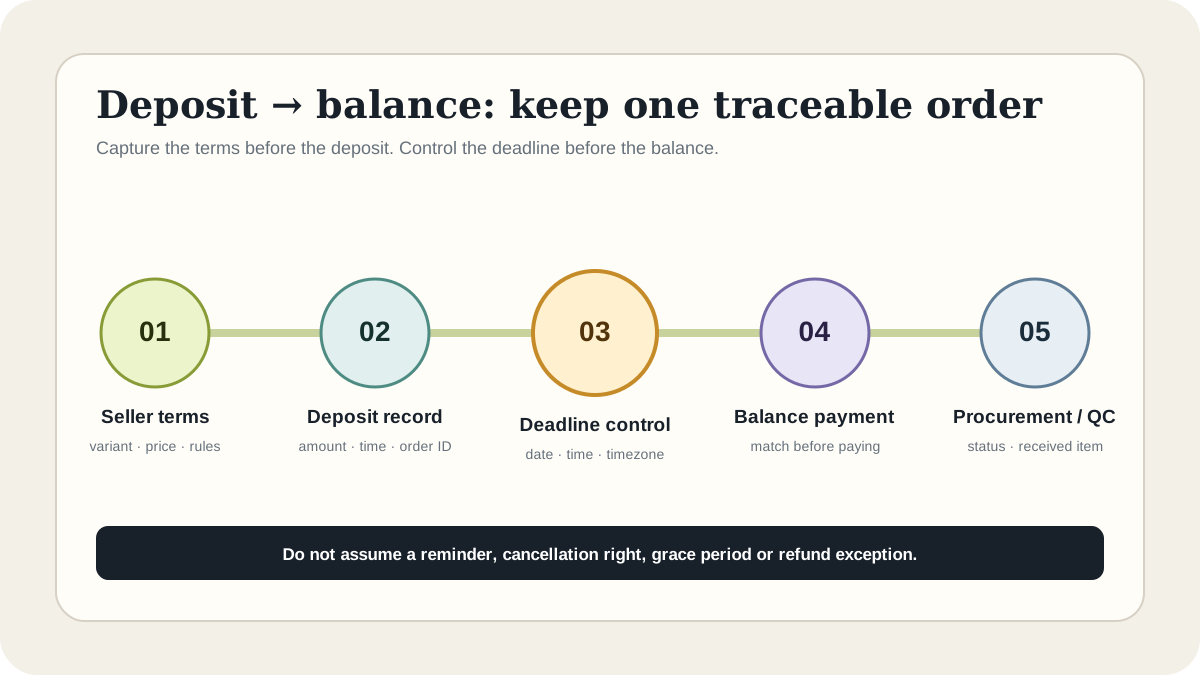
01
Confirm that the order is really a deposit presale
Start with the wording shown on the live seller listing and the PikoBuy order screen. A deposit, presale or reservation normally means the first amount is only one part of the purchase and that a second payment becomes due later. Do not infer this structure from a low displayed price alone. Save the label that identifies the first payment, the total or stated pricing method, and the balance conditions attached to the exact variant.
Match the source link, seller, product title, colour, size, quantity and order identifier. PikoBuy’s User Registration Agreement explains that PikoBuy is not the actual seller and that third-party purchasers provide purchasing-agent services for goods sourced from platforms such as Taobao and 1688. The seller’s published presale information therefore matters to the timing and commitment, while PikoBuy’s account record matters to proving what you submitted and paid.
If the listing calls the amount a reservation, earnest payment or another translated term, ask official support to confirm whether PikoBuy treats it as a deposit order before paying. A useful answer identifies whether a later balance is required and which seller record controls. A vague assurance that the item is available does not answer either question.
- Exact seller link, title and selected variant
- Deposit label, amount, currency and payment time
- Full price or balance-calculation method
- Seller-published balance window and timezone
02
Capture the complete terms before paying the deposit
Save the whole presale panel, not one highlighted number. Your record should include the deposit amount, the balance amount or the way it will be calculated, the opening and closing time for balance payment, the timezone if shown, the seller’s estimated release or shipment information, the selected option and any cancellation statement. Capture the page URL and date so the screenshot has context if the listing later changes.
PikoBuy’s public agreement says a paid deposit order cannot be cancelled under the referenced seller rules and that the deposit is not refunded when the balance is not paid by the due time. Treat the deposit as potentially irreversible before you authorise it. Do not rely on the ordinary warehouse return process as a plan for undoing a presale commitment later.
The reviewed official pages do not state a universal deposit percentage, a standard number of days before the balance is due or a guaranteed grace period. They also do not promise that every user will receive an automatic reminder. Record the seller’s actual window and set your own calendar reminders. That reminder practice is editorial risk control, not a claim about a PikoBuy feature.
03
Control the balance deadline independently
Convert the seller’s displayed window into a deadline you can act on. Keep the original timestamp and timezone in your evidence; then add a local-time note without deleting the source time. Set an early review point to confirm the order still matches, and a second reminder comfortably before the closing time. Avoid planning to pay in the final minutes, when a login, provider review or unclear amount leaves little room to resolve a mismatch.
The agreement says buyers must proactively pay the balance within the time specified in the seller’s published information. That wording means the absence of a message should not be treated as proof that no payment is due. Check the signed-in order record and the live presale terms yourself. If the screens disagree, open a support ticket promptly and preserve both versions.
Ask support to state the controlling balance deadline, timezone, amount and order identifier in writing. Do not ask for a generic PikoBuy deadline because the reviewed public pages do not provide one. If a seller changes the visible window, save the before-and-after records and ask which terms apply to the existing order; this guide cannot decide that dispute.
04
Reconcile the order before the balance payment
Before paying the balance, compare the current order with the record saved at deposit time. Confirm the same seller, product, variant and quantity; the deposit is linked to the same order; the balance amount follows the published calculation; and the payment page is inside the official signed-in flow. A new amount should be explainable by the order terms, not accepted merely because the deadline is close.
PikoBuy’s Beginner Guide says product prices are subject to the actual purchase, and the User Registration Agreement notes that product and logistics amounts can vary slightly with exchange-rate movement and settlement timing. Those statements do not authorise an arbitrary difference. Record the displayed currencies and amounts, then ask for an account-specific explanation when the arithmetic does not reconcile.
Keep the deposit record separate from the later balance transaction. For each payment, save the timestamp, currency, amount, safe provider reference and PikoBuy account status. Hide passwords, verification codes, full card numbers and card security codes. The aim is to connect two payments to one order without exposing credentials or treating a provider notification as proof that the order was accepted.
05
Make a deadline decision without assuming reversibility
If the product, variant, amount or deadline appears wrong, pause long enough to document the mismatch and contact official support—but recognise the trade-off. Paying an unexplained balance may deepen the commitment, while missing the seller’s deadline can forfeit the deposit under the published agreement. There is no universally safe answer; the evidence and the current written instruction for that order must drive the decision.
Use one concise request: ‘Deposit order [ID], source listing [URL], variant [details]. The saved seller terms show balance [amount] due [date, time and timezone], while the current order shows [difference]. Please confirm the correct balance, controlling deadline and next action for this order.’ Attach the deposit receipt, original terms and current screen with sensitive data hidden.
PikoBuy’s Contact page marks ticket submission as the recommended route and also displays a support email. Preserve one case thread, its submission time and each reply. The reviewed pages do not publish a guaranteed response time, deadline extension or refund exception for deposit cases, so do not let an unanswered ticket become an assumed extension.
06
Verify the order after the balance is paid
After balance payment, confirm that the PikoBuy account links it to the intended deposit order and shows the expected procurement or order status. Save the transaction and status rather than stopping at the payment-provider screen. PikoBuy’s Terms say placing an order is an offer to purchase and that PikoBuy or participating merchants may accept or reject it, so payment evidence and order acceptance remain distinct records.
When the item later reaches the warehouse, compare the received variant, quantity and visible condition with the preserved presale order. The Returns & Exchanges policy describes a five-day or 120-hour window for eligible warehouse-stage items after the first In Warehouse status, subject to seller agreement, product condition, packaging and category restrictions. That separate process is not a promise that a paid deposit can be reversed or that every presale item is eligible.
International shipping is another later payment stage. PikoBuy’s Beginner Guide separates the initial product payment from parcel submission and international-shipping payment. Do not mistake completion of the balance for payment of the eventual parcel cost. Keep the seller terms, both purchase payments, warehouse record and shipping payment as separate parts of one traceable file.
Practical FAQ
PikoBuy deposit and balance questions
Can I cancel a PikoBuy deposit order after paying the deposit?
PikoBuy’s User Registration Agreement says that, according to Taobao sellers’ rules, an order with a paid deposit cannot be cancelled. Check the exact seller terms and ask official support about the specific order; this independent guide cannot create an exception.
What happens if I miss the PikoBuy balance payment deadline?
The same public agreement says buyers must proactively pay the balance within the time in the seller’s published information and that the deposit will not be refunded if the balance is not paid by the due time.
Does PikoBuy use one balance deadline for every deposit order?
No universal deadline is published on the official pages reviewed on 25 September 2026. The agreement points to the time in the seller’s published information, so preserve the exact date, time and timezone for the order.
Does the 120-hour warehouse return rule guarantee a deposit refund?
No. The five-day or 120-hour rule applies to eligible items after their first In Warehouse status and remains subject to seller, condition, packaging and category requirements. It is a separate process, not a guarantee that a deposit order can be cancelled or refunded.
Source record
What this guide relies on
Platform functions and policies can change. Open the current source before relying on a route, deadline, fee or account decision.
PikoBuy User Registration Agreement — deposit cancellation, balance deadline, forfeiture, service roles and settlement variation↗PikoBuy Terms of Service — order acceptance or rejection, payment handling and account security↗PikoBuy Beginner Guide — first product payment, actual purchase price, warehouse stage and separate shipping payment↗PikoBuy Returns & Exchanges — separate warehouse timing, seller consent and eligibility boundaries↗PikoBuy Contact page — recommended ticket route and support email↗