
PikoBuy QC photos not showing after an item reaches the warehouse is a different problem from an item that has not been checked in. The account may already display In Warehouse while the image area is empty, shows the wrong order, contains too little detail, or does not answer the question needed before international shipping.
PikoBuy’s Beginner Guide says warehouse inspection after arrival includes check-in, photo confirmation and a defect check. Its Shipping Terms also say forwarded goods are photographed for confirmation and that users can view inspection photos or purchase additional detailed photos. Those statements establish a workflow, but the public pages reviewed do not publish a universal photo-upload time, a guaranteed number of standard images or a list of angles for every product.
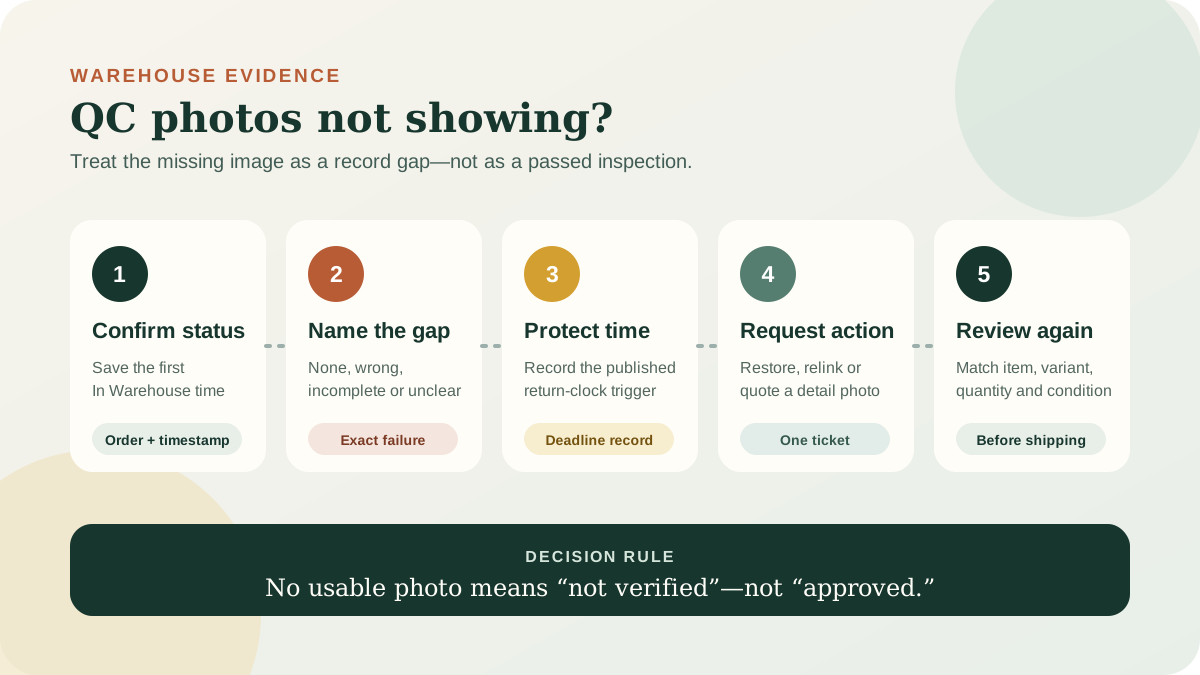
The safest response is therefore not to guess that the item passed inspection. Build a timestamped record, identify the exact photo gap, protect any warehouse return deadline and ask support for one verifiable action before submitting the item in an international parcel.
01
Confirm that the problem really begins after warehouse check-in
Start with the order page, not a domestic carrier screenshot. Save the order ID, product title, selected variant, quantity, seller link and the exact status text. Capture the first time the account shows In Warehouse, including the date, time and timezone. If the account still does not show a warehouse receipt, use the separate item-not-in-warehouse checklist; a delivery scan and a completed PikoBuy check-in are not the same event.
Then record what the image area actually does. An empty gallery, a loading error, thumbnails that will not open, photos attached to a different item and photos that omit the needed detail are separate failures. Test only simple reversible checks such as refreshing the signed-in order page or viewing it in another current browser. Do not repeatedly purchase the same service or create multiple support threads merely because the interface is unclear.
Keep the original screenshot unchanged. A useful record shows the order identifier, current status, empty or incomplete photo area and capture time in one sequence. Redact account balances, addresses, payment references and unrelated orders before sharing any image outside the official support route.
- Order ID, seller link and exact variant
- First In Warehouse date, time and timezone
- Screenshot of the empty or incomplete gallery
- Browser or app view used for the check
02
Name the photo gap before requesting a solution
Use one of four descriptions. No-photo means the item is recorded in the warehouse but the gallery contains no usable image. Wrong-photo means the image appears linked to another product, colour, size or quantity. Incomplete-photo means there are images, but they omit a visible feature needed to compare the received item with the order. Unclear-photo means the relevant area is present but cannot be judged because of distance, lighting, obstruction or resolution.
This classification keeps the request separate from the existing QC-photo interpretation guide. That guide explains what an available image can and cannot prove. Here, the problem is that the necessary evidence is absent, mismatched or unusable. Do not write only ‘QC missing’ when support could reasonably interpret that as no warehouse receipt, no defect report or no paid detail image.
Build one sentence that can be checked: ‘Order [ID] has shown In Warehouse since [time], but the gallery [is empty / shows another item / does not show the size label / will not open].’ Add the seller image or option text only when it helps identify the exact mismatch. Avoid a broad demand to inspect everything; it does not define a pass condition.
03
Separate standard confirmation photos from a detailed-photo request
PikoBuy’s Shipping Terms say forwarded goods are photographed for confirmation and tell users to view the inspection photos or purchase additional detailed photos. This supports an important distinction: a normal confirmation image and an extra detailed-photo service do not necessarily answer the same question. The public page does not define one fixed image count, angle set, price or delivery time for every order.
First ask whether the expected standard inspection record exists and is correctly attached. If it exists but cannot show a size label, measurement, connector, included part or localised defect, decide whether a focused additional image is appropriate. Before paying, preserve the current service description, price, requested angle and order link. A paid detail request should say exactly what must be visible, such as ‘place a ruler across the insole from heel to toe’ rather than ‘check the size.’
A detail image is evidence of what the camera can show, not a certification. PikoBuy’s User Registration Agreement says professional inspection may be unavailable for products such as electrical goods, models and other specialised items; inspectors may be limited to visible appearance and accessories and may not open packaging to check quality. Photos cannot establish authenticity, hidden construction, battery health, comfort or long-term performance.
04
Protect the 120-hour warehouse return clock
Do not wait indefinitely for pictures without checking the return record. PikoBuy’s Returns & Exchanges policy says the five-day period is counted from the next hour after the order status first changes to In Warehouse, with five days defined as 120 hours. The published trigger is the status change, not the moment a shopper first opens or approves the QC images.
The same policy makes eligibility conditional. The seller must support the relevant return, the product must remain in the condition and packaging required for resale, category exclusions may apply and PikoBuy says it can return a product only with the seller’s consent. A missing photo does not automatically extend the clock, prove a defect or guarantee a return.
Record the calculated deadline and ask support in writing whether the unavailable or unusable images affect the order-specific return process. If the gap prevents a decision, state that before the deadline and request the next available action: restore the standard images, correct the order association, provide the requested detail image, or explain how to submit a return review while evidence is pending. Keep the item out of an international parcel until the question is resolved.
05
Send one evidence-led support ticket
PikoBuy’s Contact page lists a support email and marks ticket submission as the recommended route. Use the official contact page or the signed-in account control, and keep replies in one thread. The page promises timely replies, but the reviewed public sources do not state one guaranteed first-response or photo-publication time for every warehouse order.
A concise opening can read: ‘Order [ID], item [title, variant and quantity], first shown In Warehouse at [date, time and timezone]. The QC gallery currently [exact problem]. I checked again at [time] using [web/app]. Please confirm whether the standard inspection photos exist and are attached to this order, and [restore them / correct the association / tell me whether the requested detailed photo must be purchased]. Please also confirm the return deadline while this is reviewed.’
Attach the smallest useful set: the warehouse-status screenshot, photo-area screenshot, order variant and any receipt for an additional-photo request. Do not email a password, full payment-card data or unrelated account records. Ask for one owner and one next action rather than opening parallel tickets that fragment the chronology.
- State the exact photo failure
- Show the first In Warehouse timestamp
- Identify any paid detailed-photo request
- Ask for one action and the current deadline
06
Review the recovered images before parcel submission
When images become available, first confirm they belong to the correct order. Match the product type, colour, size label, quantity and visible accessories with the saved seller listing and order. Compare image timestamps and any warehouse notes. If the gallery was corrected, preserve the earlier and later states so the evidence chain explains what changed.
Only then apply the category-specific QC checklist. Mark each requirement as visible and consistent, visible and inconsistent, or not shown. ‘Not shown’ is not the same as passed. Request a narrow additional view when the missing evidence could change the decision, and recognise when the limitation cannot be solved by another photograph.
Close the case only after the standard images are restored, the order-photo mismatch is corrected, the requested detail is delivered, or support gives a recorded alternative outcome. Keep the support reference, first In Warehouse time and final image set. That record protects the distinction between a warehouse-photo problem and later international shipping, where different carriers, deadlines and claim rules apply.
Practical FAQ
PikoBuy missing QC photo questions
How long should PikoBuy QC photos take after an item reaches the warehouse?
The official pages reviewed on 3 October 2026 describe photo confirmation after warehouse arrival but do not publish one guaranteed upload time for every order. Save the first In Warehouse timestamp and ask support to confirm the image status for that order.
Does In Warehouse mean the PikoBuy QC photos passed?
No. In Warehouse records the warehouse stage; it does not prove that every requested photo is visible or that the item passed every check. Review the actual images and notes before parcel submission.
Can I buy a more detailed PikoBuy QC photo?
PikoBuy’s Shipping Terms say users can purchase additional detailed photos. Check the live order page for the current option, price and terms, then make the request specific enough to show the needed detail.
Does a missing QC photo pause the 120-hour return period?
The published Returns & Exchanges policy starts the 120-hour period from the next hour after the first In Warehouse status. It does not publicly state that a missing photo automatically pauses or extends that period, so record the issue and ask support before the deadline.
Source record
What this guide relies on
Platform functions and policies can change. Open the current source before relying on a route, deadline, fee or account decision.
PikoBuy Beginner Guide — warehouse check-in, photo confirmation and defect check after arrival↗PikoBuy Shipping Terms — confirmation photos, storage and optional additional detailed photos↗PikoBuy Returns & Exchanges — In Warehouse trigger, 120-hour calculation and eligibility limits↗PikoBuy User Registration Agreement — limits of professional, internal and packaged-product inspection↗PikoBuy Contact — support email and recommended ticket route↗